SetCPU for Root Users apk 3.1.2

ImageSetCPU for Root Users apk 3.1.2 app download 

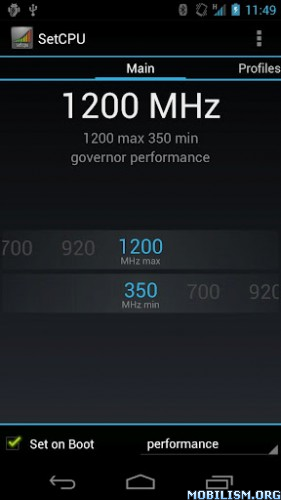
SetCPU is a tool for changing the CPU settings on a rooted Android phone or tablet, including the Galaxy Nexus, HTC One series, Nexus S, Nexus One, Motorola Droid, Samsung Galaxy series, and most other devices. You're under control: SetCPU can improve your performance, save battery, or both!

Automate SetCPU with profiles! SetCPU allows you to set up powerful profiles to change your settings under certain conditions, such as what app is running, when the phone is asleep or charging, when the battery level drops below a certain point, when the phone's temperature is too high, or during certain times of day. See the screenshots for examples of how you might set up profiles.

SetCPU's wide feature set make it useful to Android beginners and enthusiasts alike. Accelerate your processor to unleash your phone's true multitasking potential, or dial your CPU's speed down to save battery.

SetCPU also includes a "voltage control" menu, available to certain devices with custom kernels that support it, to control undervolting to save even more battery. Keep in mind that undervolting is only available for certain kernels.

Recent Changes:
Additional permission: Read logs is used for efficient app condition checking. That is currently all it's used for.

3.0.0:

Profiles tab
- Completely rewrote profiles.
- Older profiles will automatically be converted into new profiles.
- Added app and day of week in addition to the older conditions, and more are coming.
- Profiles now support combining conditions under logical trees, with nestable "and," "or," and "not" operators available. It is now possible to easily build complex profiles that take the place of multiple profiles in the older version.
- Actions can now be selected individually.
- Profiles can now be marked as "non-exclusive," which means they will not block profiles with lower priorities from evaluating. In this case, the profiles with lower priorities will perform only actions which have not been performed by profiles with higher priorities. SetCPU will keep evaluating profiles until it reaches an "exclusive" profile that evaluates as true.
- All number selectors in profiles are now in the style of the frequency selector in the main tab.
- The new file extension for exported profile settings is ".setcpu.json."
- To prevent ambiguous situations, it's no longer possible to select priorities that have been used by other profiles.
- The CPU temperature sensor on OMAP4 and some other devices should now be supported for profiles. The option will appear if available.
- Notifications are now set as an action per profile and can now be non-persistent.
- SetCPU will still use the main screen as a "default profile" to set if no other profiles are active. It is now possible to specify an alternate default profile by creating an exclusive profile with no conditions at priority 0.
- SetCPU now asks for a file name before backing up profiles to storage.
- It is now possible to share profiles without having the internal/external storage mounted.

Main tab
- IO scheduler selection has been added via a drop down menu in the main tab.

Bugfixes
- Fixed a bug where the short benchmark always reported 0 ms.
- Fixed the labels in the pie graph in system info.
- Fixed some common crashes.

Permissions:
Root: SetCPU needs root permissions to modify the CPU speed and other settings.

Start at boot: SetCPU will start a profiles service at boot, if enabled. It also sets default boot settings, if enabled. SetCPU does not run in the background if profiles are not enabled, and becomes inactive after settings, if any, are applied.

Wake lock: This prevents the phone from sleeping while stress testing and benchmarking.

Write external storage: SetCPU needs to read from and write to the SD card or internal storage to back up profiles.

Read phone state: The "in call" condition needs this to determine if the user is making a phone call or not, and trigger the profile if the user wants to.

What's in this version:
3.1.2:
- Added support for wireless chargers in profiles.
- Fixed more voltage bugs.
- Multicore control menu coming soon!
Free Download here
Plus500 apk 4.12

ImagePlus500 apk 4.12 app download 

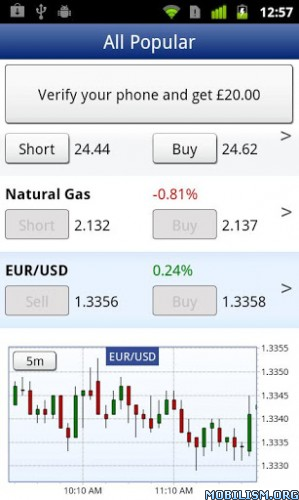
Plus500 offers the easiest way to trade on CFDs online, with an intuitive and elegant user interface.

* Remember that CFDs are a leveraged product and can result in the loss of your entire deposit. Trading CFDs may not be suitable for you. Please ensure you fully understand the risks involved.
* Trade Stocks, Indices, Forex, ETFs , CFDs, Gold, Oil and Silver. Anytime, anywhere.
* Trade the world’s most popular financial instruments at Plus500 with no commissions.
* Buy and Sell stocks online. Buy NASDAQ shares, NYSE, Euronext, LSE and many more stock exchanges.
* Get access to real-time market quotes ranging from popular stocks, indexes, forex pairs, and commodities such as oil and gold.
* Practice trading with a free unlimited demo account. When you're ready, you can also trade for money.
* Open and close positions, set limits to protect your investment.
* View your balance, equity and margin.
* Realtime charting
* Multi language support
* Leverage - up to 1:50
* Real-time live streaming quotes
* Fund your account by credit card, PayPal or wire transfer
* Authorised & Regulated by the Financial Services Authority
Free Download here

UC Browser for Android apk 9.1.0 Build 51(Update)

UC Browser for Android 9.1.0 Build 51(Update) app download
Requirements: 2.1+
Overview: UC Browser, the FASTEST and SMARTEST Android browser. The best Web browser ever.

Image

UC Browser for Android provides you fast and smooth Web surfing experience. It's a totally free app. Adaptable configuration helps you adjust your way of browsing under different network connections, reduce data cost and speed up page loading with compression. Share the best Android browser with your friends by clicking the Google+ and “Tweet“ buttons on the right.
- Best Mobile Browser Awards 2011 – About.com
- Best Android Browser Awards 2012 -- About.com
- Multi-language support.
- Top Downloaded Android Browser on Google Play in India
- The choice of 300 million users worldwide, UC Browser is definitely the most popular Web browser among the world.
★★★★★ Fuad - October 10, 2012 - Version 8.4.1
"Best browser I've used in a while
I've tried dolphin, chrome, Firefox, boat browser, opera mini and many others and I could never find one that satisfied like dolphin used before its incredible performance slowdown. But now this browser is even better than dolphin was, currently loving it on HTC Rezound"
★★★★★ Mike - October 2, 2012 - HTC EVO 3D with version 8.4.1
"Excellent!!
Finally a browser that actually works! I've downloaded so many other browsers that had so many different issues and they all don't measure up dolphin, opera, chrome, Firefox, to name a few. This I'd the complete package and it's so fast, look you don't have to take my word for it just download and see for yourself, it's extremely effective absolutely love it.... bravo, bravo UCbrowser 5 stars hands down. To officially make this browser the best on playstore is to add flash video support. That's it!!"
"In a nutshell, UC Browser For Android merges usability, simplicity, fast navigation and good-looking layout. It's what a mobile browser should be." by Androidzoom.com
*****Rate it 5 stars if you like it*****
Features:
- Share: Share your favorite pages or contents to Facebook, Twitter, Google+ with a simple press on Share button.
- Vox: Voice control over UC Browser, a most fun way to give commands.
- Multi-Touch: Play with UC Browser with your gestures, discover more gesture commands on it now.
- Download Manager: Stable and fast download speed, and file management is available on UC Browser.
- Quick Reads: This RSS Reader lets you follow up the trend by viewing news from NY Times, CNN, USA Today etc.
- Autofill: Suggestions will be shown once you start typing on address bar.
- Night Mode: Better browsing in dark environment.
1. More Powerful Download Function: Downloads will not stop even though you run the browser in background. You can share download links and downloaded files.
2. QR code scanning makes it easier to get information
3. Pin webpages to home screen.
4. URL input optimization.
5. Homepage GUI optimization.
6. DNS optimization improves the network connection speed.
7. Bugs about text box of Gmail and Facebook are fixed.
8. Bugs about page display of mobile Wikipedia and CNN are fixed.
You may be using Chrome as your PC or Mac browser. However, for your Android devices, UC Browser has to be the first choice. Download for free and try the best Android browser now.

What's in this version:
1: Preload Pages: Save time by having next page pre-loaded with intelligent analysis.
2: Background Downloading: Keep your downloads active even after exiting the browser.
3: Improved Auto-Fill: Enter the first letter of certain URLs or search terms and have them auto-filled by smart technology.
4: Enhanced Security: Reduce the risk of revealing your account and password with enhanced security measures to protect you from malicious webpages.
Free Download here

FlashLight HD LED Pro apk v1.53

FlashLight HD LED Pro v1.53 android app
Requirements: 2.1 and up
Overview: Use your Android device as a torch with this beautiful app !

Image

- It is simple and well designed
- launch it and get light instantly by pressing one button
- uses the integrated FlashLight
- also uses your full screen as a light source (works on all devices)
- add a widget for quick access

Try it. It's simply the best at what it does.

What's in this version:
- Redesigned settings
- Better Test Tool UI
- Various compatibility and stability fixes
Free Download here