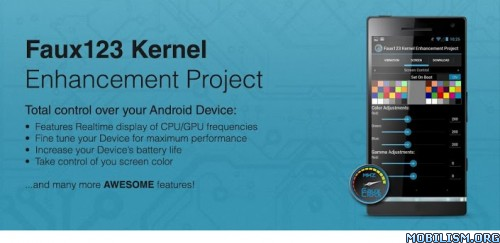
Faux123 Kernel Enhancement Pro apk 1.0.5

Image
Faux123 Kernel Enhancement Pro apk 1.0.5 app download 

Special Introductory Pricing for the first month!
Feel Free to email (reioux@gmail.com) me directly for issues and support before commenting with low ratings. Thanks!
NOTE: if "set on boot" settings DO NOT stick, change your superuser to superSU. This is the NUMBER 1 cause of settings not working!
This application OFFICIALLY supports the following ROOTED devices:
* Google / Asus Nexus 7 (WiFi and 3G models)
* Google / Samsung Galaxy Nexus (All variants)
* Google / LGE Nexus 4 (All variants)
* HTC One X International Version (Tegra3 variant)
* HTC Amaze 4G
* HTC Sensation 4G / XE (All variants)
* Samsung Galaxy S II USA Version (ATT, Tmobile)
* Samsung Galaxy S III USA Version (ATT, Tmobile, Verizon)
This application ALSO unofficially supports ALL ROOTED ICS and JB capable devices (Phones and Tablets). This app will works on ALL your other ICS/JB devices!
*** Application Features: ***
> CPU Control:
Displays cpu core frequencies in realtime
Allows adjustment of CPU governors
Allows adjustments of CPU Min/Max frequencies
Allows for "Set on boot" feature
> Voltage Control:
Displays current voltage per frequency
Adjusts CPU voltage
Allows for "Set on boot" feature
> CPU Governor Control:
(supports ondemand, conservative, interactive, intellidemand, and pegasusq governors. More to come later!)
Allows for CPU governor specific tweaks
> GPU Control:
Displays GPU freqencies in realtime
Allows selection of available GPU governors (My kernel and Qualcomm Chipsets)
Adjusts GPU max frequencies (Qualcomm Chipsets and kernels with GPU OC enabled!)
Adjusts GPU Vsync capability (Qualcomm Chipsets ONLY)
Allows for "Set on boot" feature
> I/O Scheduler Control:
(Supports built-in eMMC and SDcard if available)
Allows selection of available I/O schedulers
Adjust readahead buffer size
Allows for "Set on boot" feature
> Miscellaneous Control:
(depending on device, not all features are available)
Dynamic File Sync control
TCP Congestion Algorithm control
USB FastCharge control
WiFi power management control
USB OTG charge control
Vibration Strength control
Sweep2wake control
> Color Control:
(Currently only Galaxy Nexus, Nexus 4 and Optimus G variants* are supported, more models to come later on)
Adjusts RGB Color in realtime
Adjusts RGB Gamma in realtime
(For Nexus 4, you will NEED TO turn Screen On/Off to refresh new Gamma settings! My N4 kernel and ROOTED STOCK Kernel ONLY!)
Adjusts Contrast in realtime (Galaxy Nexus ONLY)
Adjusts Gamma look up table in realtime (Galaxy Nexus ONLY)
Allows for "Set on boot" feature
> Download Control:
(available only for OFFICIAL devices)
Checks for latest stable kernel and beta kernels
> Information:
Social networking links (Twitter, Facebook and Google Plus)
Kernel Support links (xda-developers and rootzwiki forums)

*DISCLAIMER*
I take no responsibility for any fault or damage caused by the use of this app. No warranties of any kind are given.

What's in this version:
Bug Fixes:
Bug 0071 - Fixed rare phone detection issues
Bug 0072 - Fixed various minor issues
Bug 0073 - Fixed various Zcontrol FC issues
New Features:
0067 - Add Busybox Checks
0068 - Add Intelli-Thermal Controls
0069 - Add Nexus 4 Sweep2Wake Parameter tweaks
0070 - Update HTC One's Sweep2wake UI (DoubleTap2Wake, PocketDetection, Vibration Strength etc)
Free Download here

JEFIT Pro - Workout & Fitness apk 5.0716

Image
JEFIT Pro - Workout & Fitness apk 5.0716 app download 

This is the Pro ads-free version of the JEFIT Workout Application, it includes all the functions from JEFIT Free plus some extra features for paying users:

Why JEFIT is the BEST Workout App :
- Largest exercise and routine database on the web and application
- Full Two - Way Synchronization with online JEFIT Profile.
- Easiest way to track your workouts, create routines, body statistics and lifting progress, saves all progress to keep you motivated for further exercising, fitness and workouts.
- Completely customizable routines and exercises to create a weekly workout routine all your own.

Workout Routine Planner :
- User friendly workout routine manager.
- Easily create own workout routines base on built-in exercises or custom exercises.
- Adjustable sets for each exercise.
- Support multiple routines. Easily switch among Bulking,Cutting,General and Sport Specific routines.

Smart Logging System :
- Automatic input weight and reps when you doing exercises.
- Automatic record your 1RM (1 rep maximum) for each set.
- Automatic save your best lifting record for each exercise.

Two-Way Synchronization :
- Synchronize your iPhone Workout Data with your Online Profile.
- Store information and data on the JEFIT Server and recover info in an instant
- No need to log into website to record workout data.
- Synchronize to download workout routines onto your phone

Progress Tracking System :
- Graphic chart for tracking both body stats and lifting stats
- Tracking weight,body fat, height, chest, waist, arms, shoulders, forearms,neck,hip,thighs and calves
- Auto-calculate your BMI (Body Mass Index)

Detailed Exercise Database :
- Built-in hundreds of weight training exercises categorized by body parts
- Search Function allows for ease of finding and searching exercises for workouts and routines
- Contain 500+ exercise instruction, animations and tips
- Track Cardio, Weight Lifting, Fitness and Strength Training Exercises.
- Instant Workout Function allows for users to perform an exercise without having to edit routine

Resting Timer :
- Adjustable resting timer between sets during a workout.
- Reminder for what exercise need to do next for their workout.
- Show previous training logs of the incoming exercise while taking break.

Progress and Profile Photos
- Ability to take Progress/Profile Photos with Phone's Built In Camera
- Upload Images to your JEFIT Profile without having to turn on a computer with one-click uploads
- Create Photo Albums dedicated to your Progress Photos on the JEFIT Website
- Upload pictures instantly to be set as your Profile or Avatar Photos

Interval Timer
- Countdown interval timer to perform exercises under a certain time limit
- Stop watch function to time your workouts
- One click instant switch between functions

User Reviews:
- “JEFIT is the BEST Workout App EVER! The combination of downloadble routines to mix up your workout with the ability to graph and track your bodybuilding progress online”
- “JEFIT is the best bodybuilding application on the market, never go to the gym without it”
- “This bodybuilding app is perfect”
- “I have used previous bodybuilding apps but this one takes the cake, workouts are easier to track and I never go to the gym without it”
- “Hands down the best bodybuilding app available, I Love It!”

*Note: To utilize the synchronization feature, a JEFIT.com Account is required to back up your data and keep track of your statistics with the JEFIT Website. Create a FREE JEFIT Account at http://www.jefit.com.

For more questions and answers, go to our FAQ page on the JEFIT Website. For more information about the JEFIT Android Workout/Bodybuilding Application, view our Features page or download the Android User Manual.

The JEFIT Android Application is brought to you by JEFIT Inc, one of the fastest growing workout and bodybuilding application and website today. Give JEFIT a try and see why millions of users have chosen the JEFIT Workout Application to benefit their workouts and exercises.

What's in this version:
1. New Feature: Progress picture download function.
2. Improved: Redesigned progress picture function.
3. Improved: minor UI redesign.
4. Bug-fixes:
- Fixed issue Routine syncing issues
- Fixed 1 RM charting functionality
- Fixed issue where app overrode device settings on screen-rotation
- Fixed issue where on some devices Cardio inputs were not focusing correctly
- Fixed issue when 'Clear Logs is pressed' it clears the users logs as well
- Other minor bugs.
Free Download here

My Boy! - GBA Emulator apk 1.5.3

Image
My Boy! - GBA Emulator apk 1.5.3 app download 

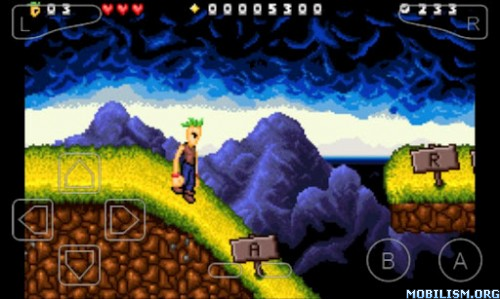
My Boy! is a super fast emulator to run GameBoy Advance games on the broadest range of Android devices, from very low-end phones to modern tablets. It does more than just emulating the full system. Thanks to the save state system, you can save progress at any time and return back to it instantly. And while enabling fast-forward in game, you can quickly skip the long boring intros/dialogs in RPGs.
*** CHEATS ACTUALLY WORK! If you can't get a cheat to work, please take a look at the FAQ on our website.
• Fastest emulation. Easily get to 60 FPS without frame skips on medium-end devices.
• Excellent game compatibility. Run nearly all games without a problem.
• Saves your battery as much as possible.
• Fast and complete video emulation (alpha blending, fading, mosaic, etc)
• Link cable emulation on the same device.
• Gyroscope/tilt/solar sensor and rumble emulation through your Android's hardware sensors and vibrator!
• Enter multilined GameShark/ActionReplay/CodeBreaker cheat codes and enable/disable them on the fly while the game is running.
• High-level BIOS emulation. No BIOS file needed.
• IPS/UPS ROM patching
• OpenGL rendering backend, as well as normal rendering on devices without a GPU.
• Fast-forward to skip long stories, as well as slow down games to get past a level you cannot in normal speed.
• Save games at any time with screenshot
• On-screen keypad (multi-touch requires Android 2.0 or later), as well as shortcut buttons such as load/save.
• A very powerful screen layout editor, with which you can define the position and size for each of the on-screen controls, as well as for the game video.
• External controllers support, through either the Android native way or input method.
• Well-designed user interface. Seamlessly integrated with the latest Android.
• Create and switch to different screen-layout and key-mapping profiles.
• Create shortcuts to easily launch your favorite games from your desktop.
No games are included in this app and you need to obtain yours in a legal way. Place them onto your SD card, and browse to them from within the app.
LEGAL: This product is not affiliated with, nor authorized, endorsed or licensed in any way by Nintendo Corporation, its affiliates or subsidiaries.
*** Unlike many others, we are the actual core developers. Your reported bugs will most likely get fixed very soon!

What's in this version:
• Fixed crash on certain German games (and probably some others).
• Fixed freeze when reading flash memory for certain games.
Free Download here

VIPER - Go Apex Nova theme apk 1.0.9

Image
VIPER - Go Apex Nova theme apk 1.0.9 app download 

Features
• 535 HD Icons (many more to come!)
• 7 HD wallpapers with wallpaper chooser
• Multiple launcher support (see below)
• Supports automatic apply and manual apply of icons
• Theme dashboard with several features, including Request Icons feature
• Daily updates for the first week of release! Weekly updates after that.
Supported Launchers

• Nova Launcher
• Apex Launcher
• Action Launcher
• ADW Launcher/EX
• GO Launcher EX
• Next Launcher 3D (Manual apply only. Jellybean users please email us for a fix.)
• Holo Launcher
• Desktop Visualizer
• May work on other launchers but this is not guaranteed.
Theme Details
Inspired by the original stock icons, each Viper icon was designed from scratch to achieve exceptional quality and consistency. Each icon has rich, colorful vivid colors to ensure all icons work well with a variety of wallpapers.
This theme has been tested on devices of several resolutions including a Nexus 4, 7, 10 and a HTC One.

What's in this version:
* 15 new icons
* See the new icons here - http://bit.ly/viperv109
Free Download here